Evernote Review 2026: Comeback or Done?
Disclosure: This post contains affiliate links. If you buy through them, we may earn a commission at no extra cost to you.
I have a complicated history with Evernote. It was my first serious note-taking app back when the free plan was genuinely generous, and I stuck with it through the slow years — the redesigns, the price hikes, the acquisition by Bending Spoons. Last month I did what I should have done years ago: I paid for a month of the top tier, imported a few thousand old notes, clipped a hundred web pages, and ran my daily note-taking through it for three weeks to write this evernote review.
The short version: Evernote is not the app it was in 2015, for better and for worse. The free plan is now so limited it barely qualifies as a free plan. Prices have climbed substantially under the new ownership. But the app itself — the sync speed, the search, the web clipper — is noticeably better than the sluggish Evernote of a few years ago. So: comeback, or done? Let me walk you through what I found.
Quick verdict: Evernote is worth it in 2026 only for a specific kind of user — someone with a large archive of documents, scans, and clipped pages who leans on search and OCR daily. For new users starting fresh, Notion or OneNote give you more for less. The free plan (50 notes, 1 notebook) is effectively a trial, so budget for at least the Starter tier if you are serious.
What Is Evernote in 2026?
Evernote is a note-taking and archiving app built around one idea: capture everything — typed notes, web pages, PDFs, photos of whiteboards, receipts — and make all of it searchable. Under Bending Spoons, which acquired Evernote in 2022 and later retired the old Personal and Professional plan names in favor of Starter and Advanced, the company has focused on two things: rebuilding the sync engine for speed and adding AI-powered search.
It is not trying to be Notion. There are no databases, no wikis, no website builder. Evernote is a digital filing cabinet with an excellent search engine bolted on. If that description sounds boring, that is kind of the point — it is infrastructure for people drowning in documents.
One important note on trust: the Bending Spoons acquisition involved significant layoffs and several price increases, and long-time users are rightfully cautious. The app works well today, but you are buying into a company whose strategy has been “charge more, serve fewer free users.” Keep that in mind as we go.
Evernote Review: Notes and Organization
The core note editor is clean and fast — noticeably faster than the Evernote I remember from 2021. Notes support checklists, tables, attachments, audio recordings, and embedded files. You organize with notebooks, stacks of notebooks, and tags.
Here is what stood out in daily use:
- Note creation is genuinely quick. From the mobile widget, I could start a voice memo or a scanned document in one tap. For capture speed, it still beats Notion.
- Tags carry the organization. With unlimited tags on paid plans, I tag by project, status, and source — and search does the rest. The 20-tag limit on the free plan is one more reason the free tier feels like a demo.
- Templates are decent but thin. Meeting notes, project plans, and daily journals are covered, but the library is much smaller than Notion’s community templates.
- Real-time collaboration exists now. The rebuilt editor supports simultaneous editing, which was a genuine weakness for years. It is still basic compared to Google Docs or Notion, but it works.
The honest limitation: if your notes need structure — linked databases, kanban views, relational data — Evernote’s notebook model will frustrate you. It organizes piles of content beautifully. It does not build systems.
Evernote Review: Web Clipper Still Leads the Pack
This is the feature that keeps people paying. Evernote’s Web Clipper browser extension remains the most reliable capture tool I have tested. In three weeks I clipped roughly a hundred pages: full articles, simplified article text, screenshots, and bookmarks.
- Full-page and simplified-article modes both worked on every site I tried, including paywalled pages I had open in the browser.
- Annotation before saving lets you highlight and mark up screenshots in the clipper itself.
- Clips land in the right notebook with tags applied automatically based on rules you set.
Competitors have narrowed the gap — Notion’s clipper is fine for basic saves — but for research-heavy workflows where you clip dozens of pages a week, Evernote’s clipper plus its search is still the combination to beat. If web clipping is central to your work, this section alone may answer whether Evernote is worth it for you.
Try Evernote free and test the Web Clipper yourself
Evernote Tasks, Calendar, and AI Search
Evernote has been expanding beyond plain notes, and this is where the evernote professional features story now lives under the Advanced plan.
Tasks are embedded directly in notes — you can turn any checklist into assigned tasks with due dates, and there is a dedicated Tasks view that aggregates them across notebooks. It is not a TickTick replacement (for task apps, see my ticktick review), but it is genuinely useful for meeting notes where action items live alongside context. Task assignment and delegation features sit on the higher tier.
Calendar integration connects Google Calendar so your schedule appears alongside your notes. I found it handy for meeting prep: open the day’s events, attach notes to each. It is a nice-to-have rather than a reason to subscribe.
AI search is the real story. The Advanced plan includes AI-powered semantic search — you can describe what you are looking for in natural language (“the receipt from the dentist last spring”) instead of guessing keywords. Combined with Evernote’s long-standing OCR, which makes text inside PDFs, photos, and even handwriting searchable, this is the strongest search in any note app I have used. Boolean search operators on the top tier add precision for power users.
The catch, as always with Evernote: the best features sit on the most expensive plan. AI search, the deepest integrations (Slack, Microsoft Teams), and unlimited everything require Advanced. If those sound essential, skip straight to pricing math below.
Evernote Review: Pricing in 2026
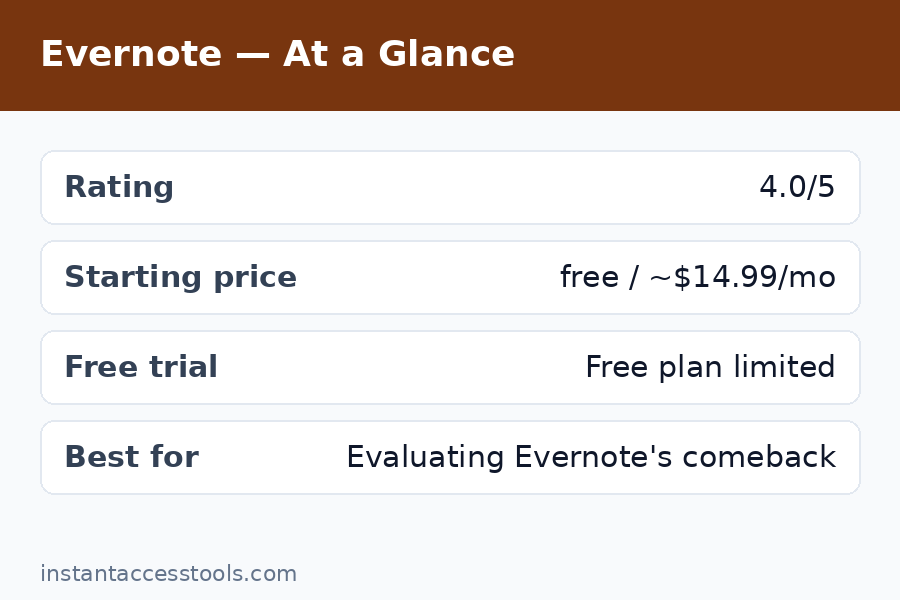
Let us talk about evernote pricing honestly, because this is where most people bounce off. Bending Spoons restructured the plans: the old Personal and Professional names are gone, replaced by Free, Starter, and Advanced (plus Enterprise for teams). Prices have risen roughly 3.6× on the top consumer tier over the past decade.
| Plan | Price (approx.) | Notes / notebooks | Monthly uploads | Key features |
|---|---|---|---|---|
| Free | $0 | 50 notes, 1 notebook | 60MB–1GB | 1 device sync, basic capture |
| Starter | ~$99/year ($8.25/mo billed annually) | 1,000 notes, 20 notebooks | 5 GB | 3 devices, Home customization |
| Advanced | ~$249.99/year ($20.83/mo billed annually) | Unlimited* | 20 GB | AI search, offline notebooks, Slack/Teams, boolean search |
*Evernote footnotes “unlimited” with safeguard limits for performance and abuse prevention.
A few things worth knowing:
- The 1,000-note ceiling on Starter is the whole story for long-time users. If you have used Evernote for years, you probably have several thousand notes. That makes your real price $249.99/year, not $99 — the Starter tier’s headline price quietly excludes the people who need Evernote most.
- “Storage” means monthly uploads, not total storage. The monthly upload allowance is what you can add each month, not a cap on your library.
- Monthly billing costs more. The annual prices above are the discounted rates; paying month-to-month runs higher at the time of writing — check the official site for current pricing.
- The free plan is effectively a trial. Fifty notes and one notebook is enough to evaluate the interface, not to run your life on. For comparison, Notion’s free plan allows unlimited pages for solo users, and OneNote is essentially unlimited.
Check current Evernote pricing on the official site
If you want the full plan-by-plan breakdown with limits, see my evernote pricing page.
Evernote Pros and Cons
After three weeks of daily use, here is my honest evernote pros and cons list.
Pros:
- Best-in-class search. OCR across PDFs, images, and handwriting plus AI semantic search is unmatched for finding things in a large archive.
- Best web clipper. Still the most reliable capture tool for research workflows.
- Fast capture on mobile. One-tap voice memos, scans with automatic perspective correction, and offline notebooks on paid plans.
- Rebuilt sync engine. Noticeably snappier than the old Evernote; changes propagate quickly across devices.
- Good offline support. Local storage on desktop and mobile means your notes work on planes and in dead zones.
Cons:
- Free plan is barely usable. The evernote free limits — 50 notes, 1 notebook, 1 device — make it the most restrictive free tier among major note apps.
- Expensive. Starter at ~$99/year and Advanced at ~$250/year cost more than Notion Plus with fewer features per dollar.
- The 1,000-note Starter cap. Long-time users are forced onto the top tier.
- Dated feel. The interface has improved but still feels conservative next to Notion or Craft.
- Weak collaboration. Fine for personal use; teams should look at Notion or OneNote.
- Trust deficit. Years of price hikes and ownership turmoil have eroded goodwill, and that matters when you are entrusting a decade of notes to a company.
Evernote vs Notion: Which Should You Choose?
The evernote vs notion question comes up in almost every note-app discussion, so let me settle it plainly.
Choose Evernote if: your workflow is capture-and-retrieve. You scan documents, clip web pages, photograph receipts and whiteboards, and you need to find any of it instantly years later. Evernote’s OCR + AI search combination is genuinely better than Notion’s search for this job, and its clipper is more reliable.
Choose Notion if: your workflow is create-and-organize. You write docs, build project trackers, manage databases, collaborate with others, or publish pages. Notion does all of this; Evernote does almost none of it. Notion’s free plan is also vastly more generous, and Plus (~$10/user/month billed annually) undercuts Evernote’s comparable tier.
The price reality: Notion Plus and Evernote Starter cost roughly the same annually, but Notion gives you databases, collaboration, templates, and unlimited pages while Evernote gives you 1,000 notes and better search. Unless search-across-scanned-documents is your daily bread, Notion wins on value.
Many people use both — Notion for active projects, Evernote as the archive. That is a legitimate setup if you can justify two subscriptions, but most people should pick one.
For the detailed head-to-head, see my full evernote vs notion comparison.
Who Should (and Shouldn’t) Use Evernote
Evernote is worth it in 2026 if you are:
- A researcher, lawyer, academic, or consultant with thousands of PDFs and scans to search
- Someone with a decade of Evernote history who relies on OCR search daily
- A heavy web-clipper user archiving articles and references
- A receipt-and-document scanner who wants everything searchable (the mobile scan workflow is excellent)
Skip Evernote if you are:
- A new user choosing your first note app — start with Notion or OneNote instead
- On a budget — the free tier will frustrate you within a week
- Building collaborative docs or project systems — Notion or Google Docs fit better
- Looking for a task manager — Evernote Tasks are a complement, not a replacement (see my ticktick review for a proper task app)
So, is evernote worth it 2026? For the archivist with a mountain of documents: yes, cautiously — the search and clipper remain unmatched, and the app is faster than it has been in years. For everyone else: probably not. The pricing is steep, the free plan is a trial in disguise, and competitors have caught up everywhere except Evernote’s two historic strengths.
Frequently Asked Questions
How much does Evernote cost in 2026?
Evernote pricing in 2026 has three consumer tiers: Free ($0 — 50 notes, 1 notebook, 1 device), Starter at around $99/year ($8.25/month billed annually — 1,000 notes, 20 notebooks, 5GB monthly uploads, 3 devices), and Advanced at around $249.99/year ($20.83/month billed annually — unlimited notes, 20GB uploads, AI search, offline notebooks, and integrations). Monthly billing costs more than annual. Prices have risen significantly under Bending Spoons, so check the official site for current pricing before subscribing.
What are the Evernote free plan limits?
The evernote free limits are: 50 notes total, 1 notebook, 20 tags, 200 attachments, sync on 1 device (plus web access), and 60MB–1GB of monthly uploads depending on current terms. This makes it the most restrictive free tier among major note-taking apps — Notion, OneNote, Apple Notes, and Google Keep all offer effectively unlimited notes for free. Treat Evernote’s free plan as an evaluation trial, not a usable long-term tier.
Evernote vs Notion — which is better?
For capture-and-search workflows (scanning, clipping, OCR), Evernote wins. For creating, organizing, and collaborating on documents and projects, Notion wins — and Notion’s free plan and Plus tier offer better value. See the evernote vs notion section above for the full breakdown. Most new users in 2026 should start with Notion.
What do you get with Evernote’s top-tier (formerly Professional) features?
The evernote professional features now live in the Advanced plan (~$249.99/year): unlimited notes and notebooks, 20GB monthly uploads, AI-powered semantic search and AI editing, boolean search operators, offline access to all notebooks, task assignment and delegation, and integrations with Slack, Microsoft Teams, and Google Calendar. If you need AI search and unlimited history, Advanced is the only tier that has it.
What are the main Evernote pros and cons?
The evernote pros and cons in brief. Pros: unmatched search (OCR + AI), best web clipper, fast mobile capture, rebuilt sync engine, solid offline support. Cons: severely limited free plan, high prices (up to ~$250/year), 1,000-note cap on the mid tier, dated interface, weak collaboration, and lingering trust concerns after years of price hikes and ownership changes.
Is Evernote worth it in 2026, or is it done?
Is evernote worth it 2026 depends on who you are. It is worth it if you have a large archive of documents and depend on best-in-class search and clipping — the app is faster and the AI search is genuinely good. It is done as a default recommendation: new users get more value from Notion or OneNote, the free plan is effectively a trial, and the pricing is hard to justify unless you use its specific strengths daily.
Evernote Review Final Verdict: Comeback or Done?
Both, honestly — and that is the conclusion of this evernote review. The product has made a comeback — the sync engine rebuild is real, the app feels fast again, AI search is a genuine differentiator, and the web clipper remains the best in the business. If you judged Evernote in 2021 and walked away, today’s app would surprise you.
The business model, though, is trending toward “done” for everyone except the faithful. A 50-note free plan is not a free plan. A 1,000-note cap on the $99 tier quietly pushes loyal users to $250/year. And at those prices, Evernote is competing with Notion Plus while offering a fraction of the features.
My recommendation: if you are an archivist, researcher, or long-time user who lives in search and clipping, pay for Advanced and enjoy the best document-retrieval tool available. Everyone else — especially anyone starting fresh — should put their money and their notes somewhere with a more generous free tier and a clearer future.
Try Evernote free — 50 notes is enough to test the search and clipper