Clockify Review 2026: Best Free Time Tracker?
Disclosure: This post contains affiliate links. If you buy through them, we may earn a commission at no extra cost to you.
I tracked over 200 hours in Clockify across three weeks — client projects, deep-work sessions, admin overhead, the lot — before writing this clockify review. I did it because the headline claim sounds too good to be true: a time tracker that’s genuinely free for teams, with paid plans starting under $4 per user. In a market where Toggl charges $9+ per seat and Harvest pushes $12, Clockify’s pricing reads like a typo.
It isn’t. But “free” comes with caveats in 2026 that didn’t exist a few years ago, the paid tiers have real trade-offs, and the interface shows its age next to Toggl’s polish. In this review I’ll cover clockify pricing in full, the clockify free plan limits you need to know, the clockify pro features worth paying for, an honest clockify vs toggl comparison, and the complete clockify pros and cons list — so you can answer the only question that matters: is clockify good for your situation?
Quick Verdict
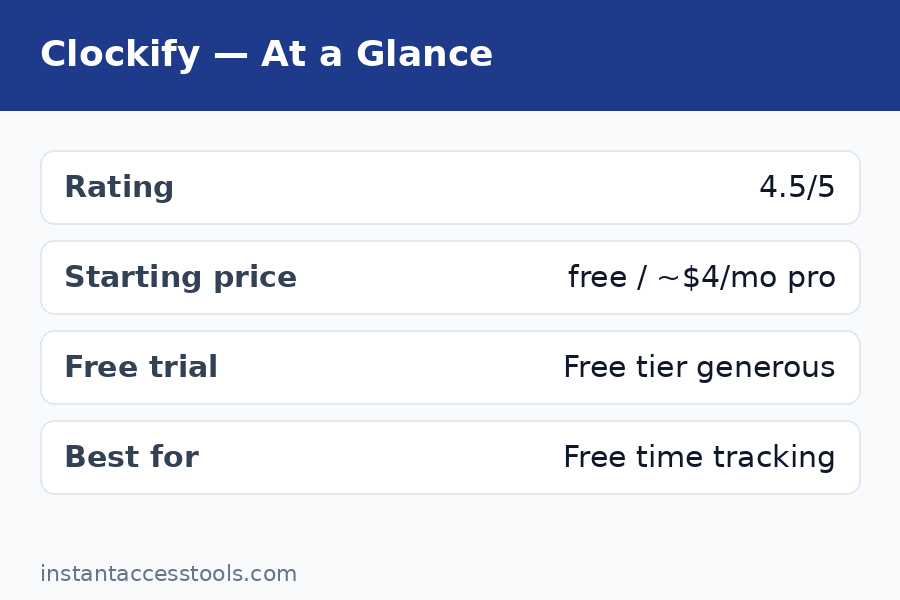
Clockify 2026 at a glance:
| Plan | Price (annual, per user/mo) | Best for |
|---|---|---|
| Free | $0 (up to 5 users) | Freelancers and tiny teams |
| Basic | ~$3.99 | Teams needing unlimited seats + admin controls |
| Standard | ~$5.49 | Invoicing, approvals, time off |
| Pro | ~$7.99 | Screenshots, GPS, scheduling, profitability |
| Enterprise | ~$11.99 | SSO, audit log, large orgs |
The bottom line: Clockify is still the best value in time tracking. The free tier is the most generous among major trackers (up to 5 users, unlimited projects and time entries, no expiry), and even Pro at ~$7.99/user undercuts Toggl’s mid-tier by more than half. The trade-off: the UI feels dated, and advanced reporting lags behind pricier rivals.
Prices are from the time of writing — check the official site for current pricing: Try Clockify free
What Is Clockify?
Clockify is a time tracking and timesheet app built by the team behind Pumble and Plaky (the Cake.com family). At its core, it does one thing: record how long you and your team spend on projects, clients, and tasks — then turn that data into reports, invoices, and profitability insights.
What makes it unusual is the business model. Clockify launched with a famously unlimited free plan and grew to millions of users on that promise. The free tier still covers the full core tracking experience — timer, manual entry, timesheets, calendar view, Pomodoro, idle detection, kiosk mode — with no time limit and no credit card required.
The company makes money on the paid tiers (Basic, Standard, Pro, Enterprise), which add administrative controls, billing, monitoring, and security features. It’s a freemium model done right: the free product is genuinely usable, and the paid features are things that actually cost money to build and support (screenshots, GPS storage, SSO).
In 2026, one important change to know: the free plan is now capped at 5 users (it was historically unlimited), so a growing team hits the paid Basic plan at the sixth seat. More on that below.
Key Features I Tested
I didn’t just click around the dashboard — I ran Clockify on real work. Here’s what stood out, feature by feature.
Time Tracking: Timer, Manual Entry, and Timesheets
The core tracking experience is solid and flexible:
- One-click timer with a prominent start/stop button. It took me about a day to build the muscle memory, and the browser extension makes it available on any page.
- Manual time entry for logging hours after the fact — essential for anyone who forgets to start the timer (me, constantly).
- Weekly timesheet view for filling in a whole week at once. My favorite for Friday admin sessions.
- Calendar view showing time blocks visually — great for spotting gaps in your day.
- Auto tracker that records which apps and websites you used (desktop app), so you can convert activity into time entries later.
- Idle detection that notices when you’ve walked away and offers to discard the idle time. Small feature, big accuracy win.
- Pomodoro timer built in — I used the 25/5 cycle during writing sprints and it worked flawlessly.
- Offline mode on desktop and mobile apps — tracking continues without internet and syncs later.
Tracking itself is on par with anything in the category. Where Clockify pulls ahead is that all of this is free.
Projects, Clients, and Tasks
Organization is straightforward: create clients, add projects under them, break projects into tasks. You can set hourly rates per project, per task, or per user — which feeds directly into billable reporting. Project templates (paid) save setup time for repeatable work, and project favorites keep your daily drivers one click away.
For freelancers juggling multiple clients, this structure is exactly right — not too rigid, not too loose. For agencies, the billable/non-billable flags and budget alerts (paid tiers) turn tracking into profitability data.
Reporting and Dashboards
Clockify’s reports cover the essentials: summary, detailed, and weekly reports, all exportable to PDF, CSV, and Excel. You can filter by user, project, client, tag, billable status, and date range. Scheduled email reports (paid) send weekly summaries automatically.
Honest assessment: the reports are good but not great. Toggl’s reporting feels more polished and its visualizations are nicer. Clockify’s custom reports (Pro) close the gap, but out of the box, expect functional rather than beautiful. For most teams, functional is plenty.
Kiosk Mode
This one surprised me. Kiosk mode turns any device into a shared clock-in/clock-out station — employees enter a PIN and punch in. It’s included in the free plan, which is remarkable: most competitors charge for this or don’t offer it at all. If you run a studio, warehouse, or retail team, this feature alone can justify choosing Clockify.
Invoicing and Expenses (Standard and Up)
The Standard plan (~$5.49/user/month annually, at the time of writing — check the official site for current pricing) unlocks invoicing: generate invoices from tracked time, add expenses, apply taxes and discounts, and send them to clients. Time off and PTO management, timesheet approvals, and manager roles round out the plan.
For freelancers, Standard is arguably the real “pro” tier — invoicing from tracked hours eliminates the spreadsheet-to-invoice shuffle that eats a Friday afternoon every month.
Scheduling, Forecasting, and Profitability (Pro)
Clockify pro features live in the Pro tier (~$7.99/user/month annually, at the time of writing — check the official site for current pricing):
- Scheduling — plan who works on what and when, then compare scheduled vs. tracked time.
- Screenshots and activity tracking — optional screen captures and app-usage monitoring for teams that need verification.
- GPS tracking — location stamps on time entries for field teams.
- Labor cost and profit tracking — set labor costs per user, and Clockify calculates project profitability automatically.
- Budget alerts and forecasting — get warned before projects overrun.
- Expenses and custom fields for deeper data capture.
The monitoring features (screenshots, GPS, activity) are the controversial ones — powerful for agencies managing remote contractors, but they need clear team communication to deploy well. I tested them with a willing colleague; they work as advertised, and everything is clearly labeled so tracked team members know what’s on.
Clockify Pricing: Full Breakdown
Clockify pricing in 2026 uses a per-seat model with five tiers. Prices below are annual billing (monthly billing costs more — roughly 20% extra on each tier).
| Plan | Annual (per user/mo) | Monthly (per user/mo) | What unlocks |
|---|---|---|---|
| Free | $0 | $0 | Up to 5 users; unlimited projects, tracking, timesheets, reports, kiosk |
| Basic | ~$3.99 | ~$4.99 | Unlimited users, admin controls, time audit, bulk edit, project templates |
| Standard | ~$5.49 | ~$6.99 | Invoicing, time off/PTO, approvals, manager roles |
| Pro | ~$7.99 | ~$9.99 | Scheduling, screenshots, GPS, expenses, profitability, forecasting |
| Enterprise | ~$11.99 | ~$14.99 | SSO, custom subdomain, audit log, dedicated support |
There’s also a 7-day free trial of Pro features (no credit card required) and a Cake.com Bundle (~$12.99/user/month) that combines Clockify with Pumble (team chat) and Plaky (project management).
The 5-user free cap matters. Clockify built its reputation on unlimited free users, and that changed in 2026 — the free plan now covers up to 5 users. A 6-person team that used to ride free now pays ~$3.99 × 6 ≈ $24/month on Basic. That’s still excellent value (Toggl’s Starter would cost that team ~$54/month), but the “free forever for any team size” headline no longer holds. Budget for it.
My read on value per tier:
- Free is a genuine gift for freelancers and micro-teams. Nothing else at $0 does this much.
- Basic is the best deal in the industry for teams of 6–20 that just need tracking plus admin control.
- Standard pays for itself if it replaces a separate invoicing tool.
- Pro is worth it for agencies that bill by the hour and need profitability data or light monitoring.
- Enterprise is for IT departments with compliance checklists.
For the full pricing deep-dive with discount strategies, see our clockify pricing guide.
Clockify vs Toggl: The Real Comparison
Clockify vs toggl is the matchup everyone asks about, so here’s the straight answer after testing both.
| Clockify | Toggl Track | |
|---|---|---|
| Free plan | $0, up to 5 users, unlimited projects | $0, up to 5 users, unlimited tracking |
| Entry paid tier | Basic ~$3.99/user | Starter ~$9/user |
| Mid paid tier | Standard ~$5.49/user | Premium ~$18/user |
| Feature depth | Invoicing, kiosk, screenshots, GPS, scheduling | Cleaner reports, better integrations, privacy-first |
| Interface | Functional, slightly dated | Modern, polished, delightful |
| Integrations | 80+ | 100+ |
| Monitoring | Screenshots, activity, GPS (Pro) | None (privacy-first by design) |
| Best for | Budget-conscious teams, agencies, field teams | Design-conscious teams, privacy-focused users |
Where Toggl wins: interface quality, hands down. Toggl’s timer is the most pleasant in the industry, its reports look better, and its integration library is broader. Toggl also takes a privacy-first stance — no screenshots, no surveillance features — which matters to some teams culturally. If you want the full pricing picture on that side, our toggl track pricing breakdown covers it.
Where Clockify wins: value and feature depth. Clockify’s paid tiers cost less than half of Toggl’s equivalents, and Clockify includes things Toggl doesn’t offer at any price: kiosk mode, invoicing, screenshots, GPS tracking, and scheduling. For a 10-person agency, Clockify Pro (~$80/month) vs Toggl Premium (~$180/month) is a $1,200/year difference for comparable-or-better capability.
My verdict on clockify vs toggl: if budget matters at all — and for most small businesses it does — Clockify wins. Choose Toggl only if you specifically value its interface polish, broader integrations, or privacy-first philosophy enough to pay double.
Clockify Review: Pros and Cons
The full clockify pros and cons list, no sugarcoating:
Pros:
- Best free plan in the category — 5 users, unlimited projects, time entries, and tracking methods, no expiry, no credit card.
- Cheapest paid tiers — Basic starts around $3.99/user; nothing comparable costs less.
- Deep feature set — invoicing, PTO, approvals, scheduling, expenses, kiosk mode, and profitability tracking rival tools costing 3× more.
- Optional monitoring done right — screenshots, activity, and GPS are opt-in per project and clearly disclosed.
- True cross-platform — native apps for Windows, macOS, Linux, iOS, and Android, plus browser extensions and offline mode.
- Unlimited everything on free — projects, clients, tasks, time entries, and team members (up to the 5-user cap).
Cons:
- Free plan capped at 5 users — the old unlimited-free promise is gone; growing teams must budget for Basic.
- Dated interface — functional but visually behind Toggl; the learning curve is slightly steeper for non-technical users.
- Reports are basic — fine for most, but power users will want Pro’s custom reports.
- Support is slower on free — priority support is a paid-tier perk; free users rely on docs and community.
- Monitoring features need care — screenshots and GPS are powerful but require transparent team policies to avoid trust issues.
- No built-in payroll — you’ll export data to a payroll tool rather than running it natively.
Who Is Clockify Good For? (And Who Should Skip It)
So — is clockify good for you? Here’s my honest segmentation:
Clockify is excellent for:
- Freelancers — the free plan covers everything a solo operator needs, including basic reports for tax time.
- Small agencies (6–20 people) — Basic or Standard delivers tracking, invoicing, and approvals at a fraction of rival costs.
- Field and shift teams — kiosk mode and GPS tracking are purpose-built for you, and nobody else includes them this cheaply.
- Budget-conscious startups — start free, upgrade to Basic at user six, and still spend less than one Toggl seat used to cost.
- Teams needing light monitoring — Pro’s screenshots and activity tracking are rare at this price.
Clockify is not ideal for:
- Design-sensitive teams — if UI polish drives adoption in your org, Toggl’s interface will get you more buy-in.
- Privacy-first cultures — even though monitoring is optional, its mere presence bothers some teams; Toggl’s no-surveillance stance may fit better.
- Enterprises with strict compliance — Enterprise covers SSO and audit logs, but specialized tools may fit complex requirements better.
- Anyone needing native payroll — Clockify tracks the hours; you’ll still need a payroll provider.
If scheduling (not just tracking) is your main need — booking clients into time slots — that’s a different category entirely; our acuity scheduling review covers the appointment-booking side.
Clockify Review: Frequently Asked Questions
Is Clockify really free?
Yes — the clockify free plan is genuinely free: $0 for up to 5 users with unlimited projects, clients, tasks, time entries, and tracking methods (timer, manual, timesheet, calendar, kiosk). No credit card required, no time limit. The main 2026 caveat is the 5-user cap — add a sixth user and you’ll need the Basic plan (~$3.99/user/month annually). Prices at the time of writing — check the official site for current pricing.
What do Clockify Pro features include?
Clockify pro features (Pro tier, ~$7.99/user/month billed annually) include scheduling, project forecasting, expenses, labor cost and profit tracking, budget alerts, screenshots and activity monitoring, GPS tracking, custom fields, and custom reports with scheduled email delivery. It’s the tier for agencies that need profitability data or light team monitoring.
Is Clockify better than Toggl?
It depends on what you value. In the clockify vs toggl matchup, Clockify wins on price (paid tiers cost less than half) and feature depth (invoicing, kiosk, screenshots, GPS). Toggl wins on interface polish, integration breadth, and a privacy-first approach with no monitoring features. For most budget-conscious teams, Clockify is the better pick; for design-driven teams, Toggl.
What are the main Clockify pros and cons?
The headline clockify pros and cons: pros include the most generous free plan in the category, the cheapest paid tiers, a deep feature set (invoicing, kiosk, scheduling), and true cross-platform apps. Cons include the 5-user free cap, a dated interface compared to Toggl, basic out-of-the-box reports, and slower support on the free tier.
Is Clockify good for freelancers?
Is clockify good for freelancers? Yes — it’s arguably the best free option available. A solo freelancer gets unlimited tracking, projects, clients, reports, and even kiosk mode for $0. If you later need invoicing, Standard (~$5.49/user/month annually) generates invoices directly from tracked time.
Does Clockify have a free trial for paid plans?
Yes — Clockify offers a 7-day free trial of Pro features with no credit card required. It’s the best way to test screenshots, scheduling, and profitability reports before committing. Start on the free plan, and only trial Pro when you know which features you want to evaluate.
Clockify Review: Final Verdict
After three weeks and 200+ tracked hours, my answer to this clockify review‘s title question is: yes — with one asterisk. Clockify remains the best free time tracker you can get, and its paid plans are the best value in the category by a wide margin. The 5-user free cap is a real step back from the old unlimited promise, but even so, no competitor matches what you get for $0.
My recommendations:
- Freelancer or micro-team (≤5): Use the free plan indefinitely. It’s more than enough.
- Growing team (6–20): Basic (~$3.99/user) for tracking + admin, or Standard (~$5.49/user) if you want invoicing and approvals.
- Agency billing by the hour: Pro (~$7.99/user) — profitability tracking and budget alerts will pay for themselves in the first month.
- Field teams: Pro for GPS, or free + kiosk mode for simple clock-in/out.
- Design-first or privacy-first teams: Look at Toggl instead and accept the higher price.
The interface won’t win beauty contests, and the free tier isn’t unlimited anymore. But on the metric that matters — capability per dollar — nothing touches Clockify in 2026.
For the complete pricing math including monthly billing and discount strategies, read our clockify pricing guide. And if your needs lean more toward scheduling appointments than tracking hours, our rescuetime vs clockify comparison covers a different angle of the time-management world.
Try Clockify free — no credit card required