Dashlane Review 2026: Premium Features Tested
Disclosure: This post contains affiliate links. If you buy through them, we may earn a commission at no extra cost to you.
I have tested every major password manager on the market, and Dashlane keeps landing in an interesting spot: it is one of the most feature-packed options you can buy — a password manager, a VPN, and dark web monitoring bundled into one subscription — but it is also one of the priciest. That combination makes the dashlane review conversation more complicated than “good” or “bad.”
So I ran Dashlane through its paces for a full month: imported my real vault of 300+ logins, used the VPN on public Wi-Fi, triggered the dark web alerts, tested the mobile apps on Android and iOS, and pushed the free plan to its limits. This dashlane review is everything I found — the genuinely impressive parts, the annoying parts, and whether the premium price tag is justified in 2026.
Quick Verdict
- Dashlane is excellent if you want an all-in-one security bundle: top-tier password management plus a real VPN and dark web monitoring in a single subscription.
- Dashlane is expensive. Paid plans start higher than most competitors, and the best features sit behind the priciest tier.
- The free plan is limited — fine for trying the interface, not enough for real daily use.
- Bottom line: Is Dashlane worth it? Yes, if you would otherwise pay separately for a VPN and a password manager. If you only need password management, cheaper rivals do the core job just as well.
What Is Dashlane?
Dashlane is a password manager founded in 2012, headquartered in New York and Paris, with over 15 million users. At its core, it does what every password manager does: stores your logins, credit cards, and secure notes in an encrypted vault, generates strong passwords, and autofills them across your browsers and devices.
What makes Dashlane different is the bundle. On its paid plans, Dashlane includes a full VPN (powered by Hotspot Shield infrastructure) and dark web monitoring that scans for your credentials in known breaches. It also packs in phishing protection, a password health dashboard, and secure sharing. In recent years, Dashlane has leaned hard into the business market, but the consumer plans remain some of the most fully loaded in the industry.
Features I Tested (and What I Actually Thought)
Password Management and Autofill
The core password manager is genuinely good. Dashlane’s browser extension autofills logins, addresses, and payment details quickly and accurately — I tested it across roughly 40 different sites during the month, and it handled everything from simple logins to multi-step bank portals. The password generator is flexible (length, character types, pronounceable options), and the vault search is fast even with 300+ entries.
One thing I appreciated: Dashlane’s insecure password changer concept. On supported sites, Dashlane can automatically rotate weak or compromised passwords for you with one click. In practice, it worked on about half the sites I tried — impressive when it works, and a reminder that the feature depends on site cooperation. Still, it is something most competitors do not attempt at all.
VPN Included: Dashlane VPN Tested
The dashlane vpn included question comes up constantly, so let me be precise: the VPN is included on Dashlane’s Premium plan (not the cheapest paid tier — more on dashlane pricing below). It is a full VPN client built on Hotspot Shield’s network, with apps for Windows, macOS, Android, and iOS.
I tested the VPN on hotel and café Wi-Fi over two weeks. Speeds were solid — I lost roughly 10-15% of my baseline on nearby servers, which is perfectly usable for streaming and video calls. There is a kill switch, and the no-logs claim comes via Hotspot Shield’s audited infrastructure. It is not the fastest VPN I have used, and server selection is more limited than a dedicated VPN service, but as a bundled extra it is genuinely useful. If you travel and work from public networks, having the VPN built into the same app as your passwords is convenient.
The honest caveat: if you are a heavy VPN user who needs specific server locations, split tunneling, or streaming-optimized servers, a dedicated VPN service will serve you better. Dashlane’s VPN is a strong backup, not a replacement for a power user’s VPN.
Dark Web Monitoring and Security Dashboard
Dashlane’s dark web monitoring scans breach databases for your email addresses and alerts you when your credentials surface. During testing, it flagged two old breaches tied to an email I use for throwaway signups — both were real, both were breaches I had forgotten about, and Dashlane walked me through changing the affected passwords. That is the feature working exactly as intended.
The Password Health dashboard scores your vault and lists weak, reused, and compromised passwords. It is clear and actionable, though I found 1Password’s Watchtower presentation slightly more polished. Dashlane’s version gets the job done and — importantly — it pushed me to fix 40+ reused passwords I had been ignoring for years.
Passkeys, 2FA, and Sharing
Dashlane supports passkeys (create, store, and sync them across devices), which is now table stakes for a premium manager. The built-in 2FA authenticator stores TOTP codes alongside your logins and autofills them — one less app to juggle. Secure sharing lets you share individual logins or collections with other Dashlane users, with revocation controls.
Biometric unlock (fingerprint, face) worked flawlessly on both my Android phone and iPhone. The mobile apps are among the better ones I have tested — clean, fast, and the autofill integration on both platforms was reliable.
What Is Missing or Weak
No password manager is perfect, and an honest dashlane review has to note the gaps:
- No desktop app for consumers — Dashlane moved to a web-app-first model. The web vault works fine, but offline access is limited compared to managers with full desktop clients.
- The VPN is not on every paid plan — the cheaper tier excludes it, which dilutes the “bundle” pitch.
- Import options are decent but not the smoothest I have used; my CSV import needed minor cleanup afterward.
- Price — the elephant in the room, covered in detail below.
Dashlane Pricing: What You Actually Pay
Let us talk dashlane pricing plainly, because the tier structure is where most people get confused.
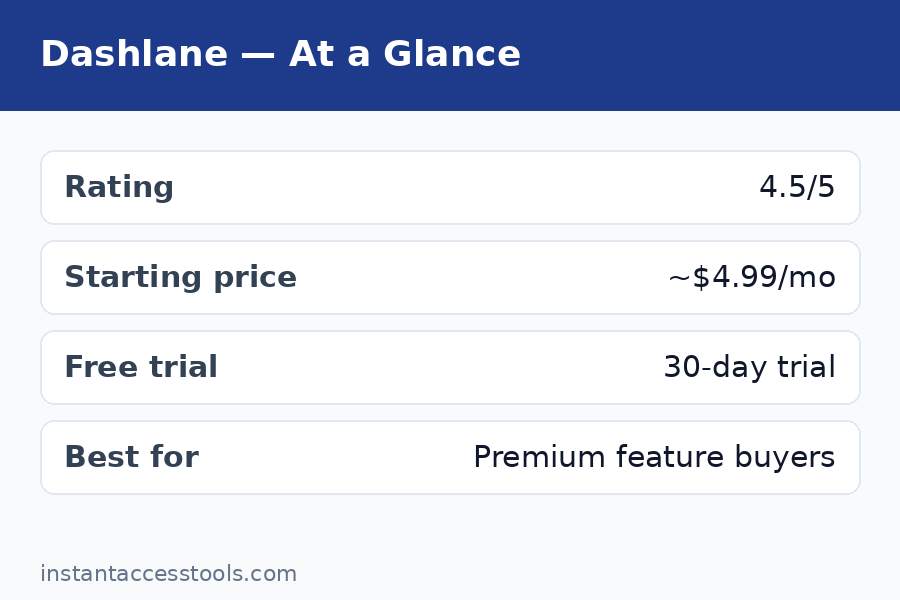
Dashlane Free plan: The dashlane free plan includes 25 logins on a single device, plus the password generator and basic autofill. Twenty-five logins sounds like a lot until you count yours — most people have 100+. The free plan is genuinely useful for one thing: testing whether you like Dashlane’s interface before paying. It is not a viable long-term setup for anyone with a real digital life. One device only, no VPN, no dark web monitoring.
Dashlane Plus: Starts at around $3.33/month when billed annually at the time of writing — check the official site for current pricing. This gets you unlimited logins, unlimited devices, dark web monitoring, and the password health dashboard. This is the tier most individuals should look at.
Dashlane Premium: Starts at around $4.99/month when billed annually at the time of writing — check the official site for current pricing. Everything in Plus, plus the VPN. This is the full bundle — and the tier this review’s “premium features tested” headline refers to.
Dashlane Friends & Family: Covers up to 10 users, priced above Premium per month when billed annually. Good value per person if you can split it.
The pricing reality check: Dashlane Plus costs roughly what 1Password Individual costs, and Dashlane Premium costs meaningfully more than either 1Password or Bitwarden. If you want a side-by-side look at every tier and what changed this year, see our dedicated dashlane pricing breakdown. The value argument only works if you actually use the VPN — a decent standalone VPN costs $3-5/month on its own, so Premium effectively bundles two subscriptions. If you would buy both anyway, Dashlane Premium can save you money. If you would not, you are overpaying for password management.
Check current Dashlane pricing — plans change, so verify the latest tiers and any promotional discounts on the official site before you commit.
Dashlane Pros and Cons
After a month of daily use, here is my honest dashlane pros and cons list:
Pros:
- Excellent autofill across browsers and complex login pages
- VPN included on the Premium plan — a real, usable VPN, not a token gesture
- Dark web monitoring that actually caught real breaches in my testing
- Automatic password changer works on supported sites
- Built-in 2FA authenticator and full passkey support
- Polished, fast mobile apps with reliable biometric unlock
- Strong zero-knowledge security (AES-256, SOC 2 Type II, bug bounty program)
Cons:
- Premium pricing — among the most expensive consumer password managers
- Free plan capped at 25 logins on one device is too limited for real use
- VPN excluded from the cheaper paid tier
- No full desktop app; web-first approach limits offline access
- Automatic password rotation only works on supported sites (about half in my test)
Dashlane vs 1Password: The Key Rivalry
The dashlane vs 1password comparison is the one I get asked about most, so here is the direct breakdown:
Choose Dashlane if: you want the VPN bundle, you like the automatic password changer concept, or you prefer Dashlane’s interface. The Premium plan’s password-manager-plus-VPN combo is something 1Password simply does not offer.
Choose 1Password if: you want the best pure password manager experience — better design polish, Travel Mode, the Secret Key security architecture, superior developer tools, and slightly lower pricing on the base tier. 1Password’s Watchtower is also a step ahead of Dashlane’s password health dashboard in presentation.
On security: both use AES-256 zero-knowledge encryption, both are independently audited, and neither has suffered a breach of customer vaults. 1Password’s Secret Key gives it a theoretical edge; Dashlane’s architecture is the same industry standard everyone else uses. For practical purposes, this is a tie.
On price: 1Password Individual starts lower than Dashlane Premium. Dashlane Plus and 1Password Individual are priced similarly. If you only need password management, 1Password gives you more polish per dollar. If you need a VPN too, Dashlane Premium’s bundle math wins.
For a deeper look at how these two stack up feature by feature, see our 1password vs dashlane head-to-head — and if you are still shopping around, our roboform review covers the best budget alternative, while the keeper review looks at another security-focused contender.
Who Is Dashlane For?
Dashlane is a great fit if you:
- Want one subscription covering passwords, VPN, and breach monitoring
- Travel frequently and use public Wi-Fi (the VPN earns its keep here)
- Have 100+ logins and want strong autofill plus automated password cleanup
- Are setting up family protection and can split the Friends & Family plan
- Prefer an all-in-one security app over juggling separate tools
Skip Dashlane if you:
- Only need password management — cheaper managers do the core job equally well
- Already pay for a dedicated VPN you are happy with
- Need a full offline desktop app
- Are on a tight budget — the free plan will not cut it long-term
Frequently Asked Questions
How much does Dashlane cost?
Dashlane’s paid plans start at around $3.33/month (Plus, billed annually) and go up to around $4.99/month (Premium, billed annually) at the time of writing — check the official site for current pricing. There is also a Friends & Family plan for up to 10 users. See the full dashlane pricing breakdown above for what each tier includes.
Is there a Dashlane free plan?
Yes. The dashlane free plan includes 25 logins on one device, the password generator, and basic autofill — no credit card required. It is good for testing the interface but too limited for real daily use; most people will outgrow 25 logins within days. Upgrading to Plus removes the caps and adds dark web monitoring.
Is the Dashlane VPN actually included?
Yes — but only on the Premium plan and above. The dashlane vpn included benefit does not apply to the free plan or the cheaper Plus tier. It is a full VPN client (Hotspot Shield network) for Windows, macOS, Android, and iOS with a kill switch. Solid for travel and public Wi-Fi; power VPN users may still want a dedicated service.
Dashlane vs 1Password: which is better?
For pure password management, I give 1Password the edge on design, Travel Mode, and the Secret Key security model. For an all-in-one bundle, Dashlane Premium wins because of the included VPN. The full dashlane vs 1password comparison above breaks down exactly who should pick which.
Is Dashlane worth it in 2026?
Is dashlane worth it? It depends on the bundle math. If you would otherwise pay separately for a password manager and a VPN, Dashlane Premium consolidates two subscriptions and is worth it. If you only need password management, no — cheaper competitors match the core features for less money. The free plan is worth trying either way since it costs nothing to evaluate.
Has Dashlane ever been hacked?
Dashlane has never reported a breach of its encrypted user vaults. It uses AES-256 zero-knowledge encryption (Dashlane cannot read your data even if it wanted to), undergoes independent security audits, and runs a bug bounty program. That said, no company is breach-proof — which is exactly why zero-knowledge architecture matters: even in a worst-case server compromise, your vault contents remain encrypted.
Final Verdict: Dashlane Review 2026
Here is where I land after a month of testing: Dashlane is a genuinely premium product with a genuinely premium price, and whether that equation works depends entirely on the VPN.
The password manager itself is excellent — fast autofill, smart breach monitoring that caught real problems in my vault, a working automatic password changer, and mobile apps I actually enjoyed using. The VPN is a real, usable bonus that performed well on public Wi-Fi. The security architecture is sound, the company is established, and nothing about the product felt half-baked.
But the price is impossible to ignore. At the Premium tier, you are paying more than 1Password, more than Bitwarden, more than almost everyone — for password management that is excellent but not clearly better than theirs. The bundle only makes financial sense if the VPN replaces a separate subscription you would buy anyway.
My recommendation: Start with the free plan to see if you like the interface. If you do — and especially if you need a VPN for travel or public Wi-Fi — Dashlane Premium is a strong all-in-one buy. If you just need great password management at a fair price, look at 1Password or a budget option first. Either way, stop reusing passwords this week: try Dashlane free and let the password health dashboard show you exactly what needs fixing.