Motion Review: Complete Guide
Motion review 2026: I tested the AI calendar that auto-plans your day – motion pricing, features, motion vs reclaim, pros and cons, and is it worth it?
Motion Review 2026: AI Calendar That Plans You?
Disclosure: This post contains affiliate links. If you buy through them, we may earn a commission at no extra cost to you.
This motion review started the way most honest software tests do: with me being extremely skeptical. An AI that plans your day? I’d seen the ads — the ones claiming Motion would “take over your calendar” — and my instinct was that it was either magic or marketing. After a full month of letting Motion schedule my tasks, meetings, and deadlines, I can tell you it’s neither. It’s a genuinely clever auto-scheduling engine wrapped in a premium-priced, opinionated product that will either delight you or drive you quietly insane. Which one depends entirely on the shape of your work life.
Quick verdict: Motion is the real deal for people whose calendars look like a game of Tetris — back-to-back meetings, dozens of competing tasks, deadlines fighting each other. Its AI scheduling genuinely works: I watched it replan my entire day around a delayed flight in seconds, and that single moment justified the experiment. But at around $34/month for an individual (no free plan, just a 7-day trial), it’s dramatically overkill for simple to-do lists. If your week is meetings and chaos, it’s worth a look. If you just need a task list, this is a Ferrari for grocery runs.
What Is Motion?
Motion is an AI-powered productivity platform that combines a calendar, task manager, project manager, and meeting scheduler into one system. Its core promise: instead of you dragging tasks into calendar slots by hand, you dump tasks in with deadlines and priorities, and Motion’s AI automatically schedules them into your day around your meetings — then reschedules everything in real time when the day goes sideways.
It also includes a meeting booking tool (a Calendly-style link for others to book you), team project management with kanban boards, and document/note features. But make no mistake: the auto-scheduling engine is the product. Everything else is a competent supporting cast.
AI Auto-Scheduling: The Core Feature, Tested
This is where my motion review gets interesting, because the scheduling engine is the thing I couldn’t test from screenshots.
How it works: you create tasks with deadlines, durations, and priority levels (from “asap” to “low”). Motion looks at your connected calendar, finds the gaps, and places tasks into optimal slots. Miss a task? It reschedules automatically. Meeting runs long? Everything shifts. I ran it through three scenarios:
Scenario 1: The normal chaotic day. Fourteen tasks, five meetings, two hard deadlines. Motion built a day that was honestly better than the one I’d have planned myself — it clustered deep work in my 9–11am peak (I’d told it my “focus hours”) and pushed admin to the post-lunch slump. I finished 12 of 14 tasks.
Scenario 2: The disruption. A client emergency ate my morning. With my old system, that meant 20 minutes of re-planning. Motion re-planned the whole day in under a minute — deadlines preserved, low-priority items bumped to tomorrow. This is the feature working as advertised, and it’s the one that sells the product.
Scenario 3: The over-packed week. I dumped 22 hours of tasks into a 9-hour available week. Motion flagged the impossible week honestly and showed me exactly which deadlines would slip — then suggested which priorities to renegotiate. I appreciated the honesty more than I’d expected.
The limitation: Motion’s scheduling is only as good as the structure you give it. Vague tasks (“work on project”) with soft deadlines get scheduled sloppily. Precise tasks with real deadlines get scheduled brilliantly. The AI doesn’t fix bad task hygiene — it amplifies whatever system you feed it.
Task Management and Auto-Planning
Beyond the calendar engine, Motion’s task management is solid but opinionated. Tasks live in projects with kanban views, subtasks, assignees, and custom fields — enough to run a small team’s workflow. The auto-planning layer is what makes it different from every other task app: the moment you give a task a deadline and duration, it has a calendar slot. Tasks that aren’t scheduled feel “homeless” in Motion, and the app nags you about them. During my test this nagging was productive pressure, not annoyance — but if you’re someone who likes a quiet backlog, Motion will feel bossy.
One thing I missed from my old setup: Motion doesn’t really do “someday/maybe” lists well. Everything wants a deadline and a slot. That’s a design philosophy, and it’s the right one for the target user (overloaded professionals), but it’s worth knowing if you’re a casual planner.
Calendar Integration and Meeting Booking
Motion connects to Google Calendar and Outlook, and syncs bidirectionally — scheduled tasks appear as real calendar events, and meetings on your connected calendar block scheduling space. The sync was reliable during my month; I saw no duplicate events or missed meetings, which is the minimum bar and it cleared it cleanly.
The built-in meeting scheduler is genuinely good: you get a booking link with your availability rules, and — this is the clever part — booked meetings feed back into the auto-scheduler, which re-plans your tasks around them instantly. I ran it against my old scheduling tool for two weeks and preferred Motion’s version. It also supports team scheduling links, which small teams will appreciate. One nit: availability rules aren’t as granular as the dedicated scheduling tools I covered in my acuity pricing guide, so heavy appointment businesses may still want a specialist.
Motion Pricing: The Expensive Truth
Let’s talk about motion pricing, because this is where the conversation gets serious.
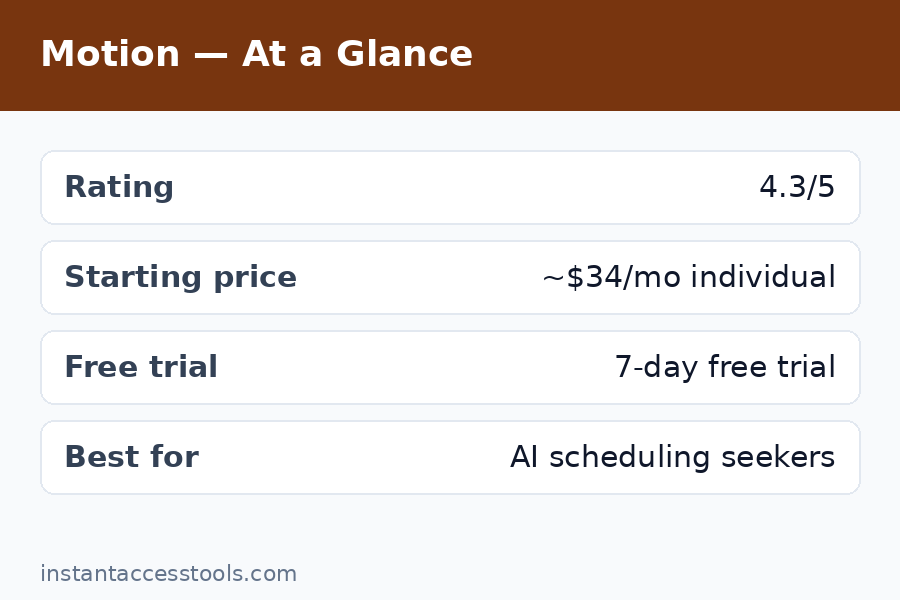
Motion’s Individual plan runs around $34/month billed monthly (roughly $19/month billed annually) at the time of writing — check the official site for current pricing. The Team plan is per-user at higher rates. And critically: there is no free plan. You get a 7-day free trial, and then you pay or you leave.
That makes Motion one of the most expensive individual productivity apps on the market — more than double most task managers, and priced like a professional tool rather than a consumer app. During my month of testing, I kept asking myself whether the auto-scheduling was worth it, and my honest answer is: it depends on your hourly value. If Motion saves you 30 minutes of planning per week and your time is worth $50/hour, it pays for itself in a week. If you’re a student managing three tasks a day, the math is brutal.
The 7-day trial is also genuinely short. It took me about ten days to really understand the auto-scheduling — seven days gets you the honeymoon, not the marriage. I’d have liked a longer trial at this price point, and this is my single biggest criticism of the commercial terms.
See current Motion pricing and start the 7-day trial — prices change, so confirm the official site before committing.
Motion vs Reclaim: The Honest Comparison
The motion vs reclaim question is the other half of this category’s decision, and readers ask me about it constantly. Reclaim is the closest competitor: it also auto-schedules tasks and habits around your calendar using AI, and it also targets overloaded professionals.
The differences, from having tested both:
- Pricing: Reclaim is significantly cheaper, with a limited free tier and paid plans well below Motion’s. If price is the deciding factor, Reclaim wins immediately.
- Depth of scheduling: In my testing, Motion’s scheduler handled complex, multi-project weeks better. Reclaim is excellent for habits, routines, and meeting management but felt slightly less capable with 20+ competing tasks.
- Scope: Motion is an all-in-one (tasks, projects, docs, meeting booking, calendar). Reclaim is more narrowly a smart calendar layer on top of your existing tools — it plays nicer with other apps rather than replacing them.
- Philosophy: Motion wants to be your productivity system. Reclaim wants to optimize the one you have.
Bottom line: If you want one app to replace everything and you’re willing to pay for it, Motion. If you like your existing task manager and just want smarter scheduling at a fraction of the price, Reclaim. This is the real fork in the road for this category.
Motion Pros and Cons
Motion pros
- AI auto-scheduling genuinely works — it replanned my disrupted days in seconds
- Excellent at handling overloaded, meeting-heavy calendars
- All-in-one: tasks, projects, docs, meeting booking, calendar in one subscription
- Reliable Google Calendar and Outlook sync
- Meeting scheduler with smart availability that feeds the auto-planner
- Focus-hour awareness — it protects deep work blocks intelligently
Motion cons
- Premium pricing: around $34/month individual, no free plan, only a 7-day trial
- Overkill for simple task lists — a Ferrari for grocery runs
- Demands good task hygiene; vague tasks get scheduled poorly
- Weak “someday/maybe” handling — everything wants a deadline
- The app is opinionated and can feel bossy about unscheduled work
- 7-day trial is too short to fairly evaluate a product this complex
For contrast with classic tracking tools rather than AI schedulers, my rescuetime review and clockify review cover the time-tracking side of the category.
Who Is Motion For?
Motion is worth it if:
– Your calendar is a Tetris game of meetings and you spend real time re-planning days
– You manage dozens of competing tasks with hard deadlines across projects
– You want one system instead of five apps duct-taped together
– Your time is valuable enough that 30 saved minutes a week covers the subscription
Motion is NOT for you if:
– You have a simple task list and a light calendar (try a free task manager instead)
– You need a free plan — Motion doesn’t have one, full stop
– You want a passive “someday” list without deadlines and scheduling pressure
– You’re price-sensitive — the subscription is premium and unapologetic
Frequently Asked Questions
Is motion worth it?
That depends entirely on the chaos level of your schedule. In my month-long test, Motion’s auto-scheduling genuinely saved me 20–30 minutes of re-planning per week and protected my deep-work hours better than I did manually. For an overloaded professional billing $50+/hour, it pays for itself quickly. For someone with a simple routine and a handful of tasks, no — it’s expensive overkill, and the 7-day trial will confirm that fast.
How much does Motion cost?
The Individual plan is around $34/month billed monthly (roughly $19/month billed annually) at the time of writing — check the official site for current pricing. Team plans are priced per user and higher. There is no free plan; only a 7-day free trial. Motion is one of the priciest individual productivity apps available, and the pricing is my biggest reservation in this review.
Motion vs Reclaim — which AI scheduler is better?
Both are excellent at auto-scheduling, but they serve different philosophies. Motion is an all-in-one system (tasks, projects, docs, booking, calendar) with deeper scheduling for complex weeks, at a premium price. Reclaim is cheaper, has a free tier, and works as a smart layer on top of tools you already use — better for habits and routines, slightly less capable with heavy multi-project loads. Price-conscious: Reclaim. All-in-one replacement: Motion.
Does Motion have a free plan?
No. Motion offers a 7-day free trial and then requires a paid subscription. There is no ongoing free tier, which sets it apart from most task managers and even from competitors like Reclaim. Given the price, I found the 7-day trial short — it took me about ten days to fully appreciate the auto-scheduling engine.
What are the main motion app features?
The headline features are AI auto-scheduling (tasks placed and re-planned automatically around your calendar), task and project management with kanban boards, a built-in meeting booking tool, calendar integration with Google Calendar and Outlook, focus-hour protection for deep work, team collaboration, and documents/notes. The auto-scheduler is the differentiator; everything else is competent but not unique.
Can Motion replace my calendar and task manager?
Yes, and that’s the design intent. During my test I ran my entire workflow — tasks, deadlines, meetings, booking link — inside Motion for a full month and closed my old task app and scheduling tool. The bidirectional calendar sync kept everything consistent. The trade-off is lock-in: Motion wants to be your whole system, and migrating out later means rebuilding your workflow elsewhere.
Final Verdict
So, after a month of this motion review: is Motion the AI calendar that plans you? Largely, yes — the auto-scheduling is the rare AI productivity feature that works as advertised, and watching it replan a wrecked day in seconds is the kind of moment that makes you a believer. It’s the best tool I’ve tested for the specific pain of overloaded, meeting-dense calendars.
But “best for overloaded calendars” is doing a lot of work in that sentence. The pricing is premium with no free plan and a too-short trial, and for simple workflows it’s spectacularly over-engineered. My honest recommendation: take the 7-day trial, dump your real chaotic week into it — not a test week, your real one — and watch what happens on the first day something goes wrong. If the instant re-planning feels like a superpower, the subscription will pay for itself. If it feels like an expensive nag, you’ve got your answer.
Try Motion free for 7 days — connect your real calendar, add your real deadlines, and stress-test the auto-scheduler on your worst week.
The AI-calendar category is only going to get more competitive, and cheaper options like Reclaim are closing the gap. But right now, for the overloaded professional who wants one system to rule the chaos, Motion is the most capable scheduler I’ve tested — as long as your budget and your workload both justify it.