TickTick vs Todoist: Which To-Do App Wins 2026?
Disclosure: This post contains affiliate links. If you buy through them, we may earn a commission at no extra cost to you.
The ticktick vs todoist debate is the closest thing the productivity world has to a rivalry, and honestly, it’s a good one — both apps are excellent, both have millions of loyal users, and neither is an obvious loser. But they’re excellent in different ways, and picking the wrong one means fighting your own tool for a year.
I tested both apps side by side for a month: same tasks, same projects, same chaotic schedule. I ran my work deadlines through Todoist one week and TickTick the next, tracked habits in both, time-blocked my calendar in both, and paid for both premium tiers so I could compare the full experience. This is my ticktick vs todoist honest review — no sponsored spin, no fence-sitting, just what I found and which app I’d actually pay for.
Quick context on where I started: I’ve used Todoist on and off for years and came into this comparison slightly biased toward it. TickTick won me over in places I didn’t expect. Here’s the full breakdown.
Quick Verdict
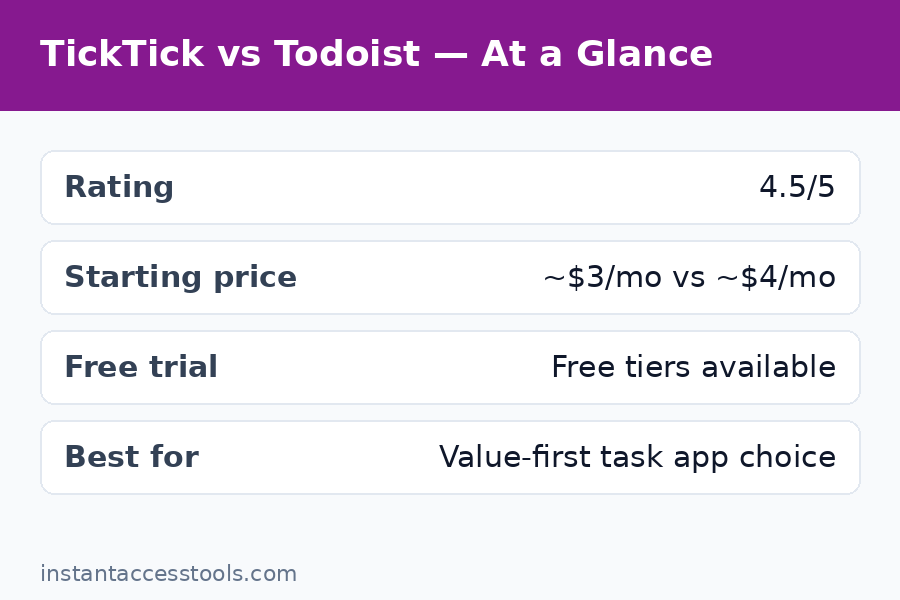
Choose TickTick if you want the better all-in-one value: built-in calendar, habit tracker, and Pomodoro timer, a more generous free plan, and a cheaper Premium tier (~$35.99/year vs Todoist’s ~$48/year). It’s the best task app for people who want one app to replace three.
Choose Todoist if you live by natural-language quick entry, need deep third-party integrations, collaborate with a team, or want the most polished cross-platform experience. Its task capture is still the fastest in the business.
For the skimmers: TickTick wins on value and built-in features; Todoist wins on capture speed, integrations, and team use. Neither is a bad choice — but one of them is almost certainly better for you.
TickTick vs Todoist: Side-by-Side Comparison
| Feature | TickTick | Todoist |
|---|---|---|
| Free plan | 9 lists, 99 tasks/list, calendar, habits, Pomodoro | 5 projects, 5 collaborators, basic filters |
| Premium price | ~$35.99/year (~$3.99/mo) | ~$48/year (~$5/mo) |
| Built-in calendar | Yes, full calendar with timeline view | Basic; calendar layout via paid plan |
| Habit tracker | Built-in, with streaks and stats (Premium) | No |
| Pomodoro timer | Built-in, with focus stats (Premium) | Via integration only |
| Natural language input | Good | Excellent (industry best) |
| Subtasks | Up to 199 (Premium) | Unlimited nesting |
| Reminders | 5 per task (Premium), location-based | Yes (paid), location-based |
| Integrations | Good (Google Calendar, etc.) | Excellent (100+ apps) |
| Team/business plan | No | Yes (Business ~$72/user/yr) |
| Platforms | iOS, Android, Web, Windows, Mac, Watch | iOS, Android, Web, Windows, Mac, Watch, Linux |
| Offline mode | Yes | Yes |
| AI features | Basic smart features | AI Assistant (paid add-on) |
Prices are approximate at the time of writing — check the official sites for current pricing. For a pricing-only deep dive, see my ticktick pricing breakdown.
Round 1: Built-In Features — TickTick’s Home Turf
This is where TickTick pulls ahead decisively, and it’s the round that changed my mind about the app.
TickTick isn’t just a to-do list — it’s a productivity suite wearing a to-do list’s clothes. The built-in calendar is genuinely good: month, week, and timeline views, drag-and-drop scheduling, task durations, and third-party calendar subscriptions (Google, Outlook, iCloud) on Premium. I time-blocked my entire workday inside TickTick and never opened a separate calendar app.
The habit tracker is the sleeper feature. Daily check-ins, streaks, achievement stats, and historical data on Premium. I tracked exercise, reading, and a “no phone after 11 PM” habit for the full month. Todoist has nothing comparable — you’d need a separate app like Streaks or Habitica.
The Pomodoro timer with focus statistics is the third built-in tool. Set a 25-minute focus session tied to a specific task, take your breaks, and review your focus trends weekly. On Premium, the stats view showed me exactly when my focus collapsed each day (2:30 PM, like clockwork), which changed how I schedule deep work.
Todoist’s answer to all of this is integrations. And to be fair, Todoist integrates with everything — but “install three apps and connect them” is not the same as “it just works out of the box.” If you want one app that handles tasks, habits, focus, and scheduling, TickTick wins this round by a mile.
Try TickTick’s built-in calendar, habits, and Pomodoro free — the free plan includes all three, so you can test the full experience.
Round 2: Capturing Tasks — Todoist’s Home Turf
If Round 1 was TickTick’s, Round 2 belongs to Todoist, and it’s not close.
Todoist’s natural-language input remains the best in the business. Type “Submit report every Friday at 4pm #Work p1” and Todoist parses the recurring schedule, the 4 PM time, the project, and the priority — instantly, flawlessly. I tested dozens of complex entries (“Call dentist tomorrow at 10am,” “Water plants every 3 days starting Saturday”) and Todoist nailed nearly all of them on the first try.
TickTick’s natural-language input is good — dates, times, and basic recurrence parse fine — but it’s a half-step behind. Complex recurrences (“every last Friday of the month”) sometimes needed manual fixing, and the parsing felt slightly less magical. For a power user capturing 20+ tasks a day, that friction adds up.
Todoist also wins on capture speed across platforms: the quick-add shortcut is instant everywhere, the mobile widget is snappier, and the email-to-task forwarding is more reliable in my testing. TickTick’s quick-add is fine, but Todoist’s feels like it was designed by people who are personally offended by slow software.
Winner: Todoist. If your biggest productivity bottleneck is getting tasks into the system fast, Todoist is still king.
Round 3: TickTick vs Todoist on Price and Free Plans
This round is straightforward, and the numbers favor TickTick:
- TickTick Premium: ~$35.99/year. Todoist Pro: ~$48/year. That’s roughly $12/year in TickTick’s pocket — every year, forever.
- Free plans: TickTick’s free tier (9 lists, subtasks, calendar, habits, Pomodoro, one reminder per task) is meaningfully more generous than Todoist’s (5 projects, limited filters, no reminders on free). You can run a real personal system on TickTick free; Todoist free feels like a trial by comparison.
- What’s included: TickTick Premium bundles the calendar, habit stats, and Pomodoro history. Todoist Pro’s headline features are reminders, filters, and calendar layout — while its AI Assistant is a separate paid add-on, and habits/Pomodoro don’t exist at all.
Todoist does offer a Business plan for teams (~$72/user/year), which TickTick simply doesn’t have — so if you need team features, Todoist wins by default. But for individual users comparing premium tiers, TickTick delivers more features for less money. My full ticktick pricing guide breaks down every plan, limit, and discount in detail.
Winner: TickTick — cheaper premium, better free plan, more built in.
Round 4: Task Management Depth — A Split Decision
Both apps handle the fundamentals (tasks, subtasks, priorities, due dates, labels/tags, recurring tasks) well, but they diverge on depth:
Todoist offers unlimited subtask nesting, more sophisticated filters (its query language is genuinely powerful — “no date & #Work & overdue” style queries), and better project organization with sections and boards. For complex project management with dozens of nested tasks, Todoist’s structure holds up better. Its Karma system (gamified productivity points) is a nice motivational touch TickTick lacks.
TickTick counters with the timeline calendar view, task durations, and the Eisenhower Matrix view — tools that make planning your day easier even if the underlying task hierarchy is simpler. The ability to see tasks as time blocks and drag them around a daily timeline is something I missed immediately when switching back to Todoist.
In practice: Todoist is better at organizing complex work; TickTick is better at scheduling your day. I found myself organizing big projects in Todoist-style hierarchies but actually executing my days in TickTick’s calendar view. Your winner here depends on whether your pain is “too many tasks to organize” (Todoist) or “I know my tasks but can’t fit them into my day” (TickTick).
Winner: Tie — different strengths, pick your pain point.
Round 5: Integrations and Ecosystem — Todoist Takes It
Todoist has been around longer and it shows in the ecosystem: 100+ integrations including Gmail, Outlook, Slack, Zapier, IFTTT, Toggl, and dozens of niche tools. The API is mature, the developer community is active, and if you use any automation platform, Todoist is almost certainly supported.
TickTick’s integrations are adequate — Google Calendar, Outlook, Siri/Google Assistant voice input (which is actually excellent — voice-adding tasks while driving worked flawlessly), and basic Zapier/IFTTT support. But the catalog is thinner, the API is less documented, and some niche integrations simply don’t exist.
For most personal users, TickTick’s integration set is plenty. But if your workflow depends on connecting your to-do list to a CRM, a dev tool, or a complex Zapier automation chain, Todoist’s ecosystem is the safer bet.
Winner: Todoist.
Round 6: Apps, Design, and Daily Feel — Subjective, But It Matters
You’ll spend hours a day in whichever app you choose, so the daily feel counts.
Todoist is the more polished app: cleaner typography, smoother animations, more consistent design across platforms, and a Linux app for the three of you who care. It feels like a product with a large design team behind it — because it is.
TickTick is slightly less refined visually — some screens feel a bit dense, and the settings menus have that “translated by engineers” quality. But it’s highly customizable (themes, swipe actions, custom smart lists), and once configured to your taste, it gets out of your way. The mobile apps are excellent, the widgets are genuinely useful, and sync is fast and reliable.
One genuine TickTick advantage: voice input. Adding tasks via Siri or Google Assistant is smoother than Todoist’s equivalent in my testing — faster parsing, fewer corrections. If you capture tasks hands-free often, that’s a real daily win.
Winner: Todoist on polish, TickTick on customization. Slight edge to Todoist overall.
TickTick vs Todoist Pros and Cons
Here’s the ticktick vs todoist pros and cons summary in one place:
TickTick — Pros:
– Built-in calendar, habit tracker, and Pomodoro timer (no extra apps needed)
– Cheaper Premium (~$35.99/yr) with a more generous free plan
– Excellent voice input and mobile widgets
– Timeline view and task durations for real day-planning
– Highly customizable interface
TickTick — Cons:
– Natural-language input a half-step behind Todoist
– Thinner integration ecosystem
– No team/business plan
– Slightly less polished UI
– Smaller user community and fewer templates
Todoist — Pros:
– Best-in-class natural-language quick entry
– Huge integration ecosystem (100+) and mature API
– Powerful filters and unlimited subtask nesting
– Team/business plans available
– Polished, consistent design across every platform
Todoist — Cons:
– More expensive (~$48/yr) with a stingier free plan
– No built-in habits, Pomodoro, or real calendar
– AI features cost extra
– Reminders require paid plan
– Can feel like it needs add-ons to match TickTick’s built-ins
If you want the longer-form single-app perspective that fed into this ticktick review comparison, my ticktick review covers TickTick’s features, quirks, and interface in depth — and the mirror comparison from the other direction lives at todoist vs ticktick.
TickTick vs Todoist: Who Should Pick Which?
Forget feature lists — here’s who each app is actually for:
Pick TickTick if you:
– Want one app for tasks, habits, focus sessions, and scheduling
– Are price-sensitive and want maximum value (~$36/yr)
– Plan your day as time blocks on a calendar
– Capture tasks by voice often
– Are an individual user who doesn’t need team features
– Like customizing your tools to fit your workflow
Pick Todoist if you:
– Capture tasks constantly and need the fastest possible input
– Manage complex projects with deep task hierarchies
– Depend on integrations with other work tools
– Collaborate with a team or clients
– Prefer polished, minimal design out of the box
– Want the biggest community and template library
My personal call: I kept TickTick. The deciding factor wasn’t any single feature — it was waking up, opening one app, and seeing my calendar, my habits, and my tasks in one place. Todoist is the better task manager; TickTick is the better daily system. For how I actually live my days, the system won.
TickTick Premium Review: Is the Paid Tier Worth It Here?
Since price is central to this comparison, a quick ticktick premium review note: Premium (~$35.99/year) unlocks custom smart lists, 5 reminders per task, full habit statistics, complete Pomodoro history, timeline calendar views, and 30 calendar subscriptions. During my testing month, the smart lists and layered reminders were the features I used daily; the habit stats were the feature that surprised me with how motivating they were.
Compared against Todoist Pro (~$48/year), TickTick Premium gives you more built-in functionality for less money. The only scenario where Todoist Pro justifies its premium is if you specifically need its superior filters, integrations, or team features — otherwise TickTick Premium is the value play.
Frequently Asked Questions
Which is better in 2026, Todoist or TickTick?
The honest todoist vs ticktick 2026 answer: neither is objectively better — they’re better at different things. TickTick wins on value, built-in features (calendar, habits, Pomodoro), and free-plan generosity. Todoist wins on task capture speed, integrations, project organization depth, and team features. Pick based on the decision guide above, not on a star rating.
Is TickTick really cheaper than Todoist?
Yes. TickTick Premium starts at around $35.99/year versus Todoist Pro at around $48/year — about $12/year less, with a more generous free tier and more features built in (calendar, habit tracker, Pomodoro) that Todoist lacks entirely. Prices are approximate at the time of writing; check both official sites for current pricing.
Can I try both before paying? Is there a free trial?
Yes — this is the best part of the ticktick vs todoist free trial situation. Both apps have genuinely usable free tiers with no credit card required, so you can run them side by side for a couple of weeks like I did. Both also offer trial periods of their premium features. My advice: don’t just click around — migrate your real tasks into each for a full week. The right app reveals itself fast.
Which app is better for students?
TickTick, in my opinion. The free plan is generous enough for student life (9 lists covers courses, assignments, personal, and then some), the built-in Pomodoro timer is perfect for study sessions, and the habit tracker works well for building study routines. Todoist’s free plan is more restrictive, and students rarely need its deep integrations. Plus, TickTick has offered student discounts on Premium in the past.
Which is better for teams and collaboration?
Todoist, without contest. TickTick has shared lists but no real team plan — no admin controls, no team workspaces, no per-seat management. Todoist Business (~$72/user/year) is built for teams with shared projects, roles, and activity tracking. If collaboration is central to your work, Todoist is the only viable choice of the two.
Do TickTick and Todoist work offline?
Yes, both offer solid offline modes on mobile and desktop — tasks you add offline sync when you reconnect. In my testing, both handled airplane-mode capture reliably, with TickTick’s sync feeling marginally faster on reconnection. Neither app will leave you stranded without a connection.
Final Verdict: Which To-Do App Wins 2026?
After a month of side-by-side testing, here’s my ticktick vs todoist honest review conclusion: TickTick wins for most people in 2026. It’s cheaper, its free plan is more generous, and the built-in calendar, habit tracker, and Pomodoro timer replace two or three other apps — which is real money saved and real friction removed. For individual users who want one calm, capable system for running their days, TickTick is the best task app value on the market right now.
Todoist remains the pick for a specific, important audience: fast capturers, integration-heavy workflows, complex project hierarchies, and teams. Its quick-add is still unmatched, and its ecosystem is deeper. If any of that describes you, you’ll be happier with Todoist — and it’s still an excellent app I’d recommend without hesitation.
But if you’re a solo user staring at both download buttons wondering which to try first? Start with TickTick. Among all the todo list apps 2026 has to offer, it’s the one I’d hand to a friend and say “just use this” — and the price makes it an easy yes.
Try TickTick free and compare it yourself — run your real tasks through it for two weeks alongside Todoist, and let your own workflow decide. And if you want the pricing details before committing, my ticktick pricing breakdown has every plan, limit, and discount covered.